
Elf ideas planner: plan the elf's month
For parents: the planner in Elf O'Clock, a digital advent calendar app for kids, picks tonight's elf setup for you, so you never have to think of one at 10pm.
One payment. No subscription, no ads, no extras. Out now on iPhone and iPad. Coming soon to Android.
Answer two quick questions and the app plans a setup for every night, from things already in your house. Each night is one card: a picture, the steps, what you need, and how long it takes.
- 225 pictured ideas. Every setup has its own picture, rated for effort, time and mess. The pictures are made with AI from our own descriptions, and each one is checked by hand.
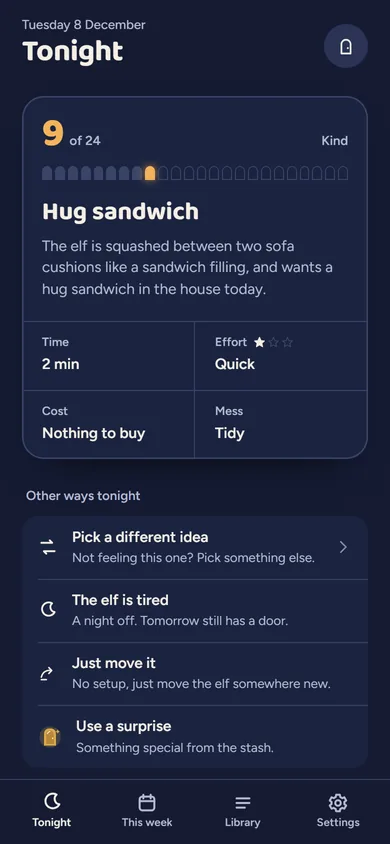
- Tonight, one card. Open the app in the evening and tonight's setup is there. Tap Done and go to bed.
- Swaps. "Pick a different idea", a no-mess swap, or "The elf is tired" for a night off. The kids still get their door.
- Strike night. Pick up to three nights when the elf goes on strike. There is nothing to set up (two placards and a demands sheet to print, if you like), and in the morning the kids bargain it back to work.
- The morning matches. When a night is linked, the morning door tells the story of what the elf got up to.
- This week and a shopping list. See the next few nights at a glance, and check what you have before a big shop.
- Planning is optional. It's off with Light help and on with Medium or Full; switch it on or off in Extras at any time.
One phone or tablet. Elf O'Clock keeps everything on the phone or tablet it's on: there's no account, it works with no internet, and nothing leaves the phone unless you share it. You can share it with up to five family members through Apple Family Sharing or Google Play Family Library, but each device keeps its own doors and plan, so for one family calendar, use one device: the kids open their doors, and you plan behind your code on the same screen. Want a nudge on your own phone as well? Add the elf to your calendar: a reminder each night with an idea, made on this website.
Try a door See what a morning door looks like, in your browser.
Elf Letters and more
A few emails a week until Christmas, with ideas, tips, printables and news, and one the day the app is out. Then the odd one through the year.
If that address is right, a confirmation email is on its way. Tap the link in it and everything is yours.
Sorry, our emails aren't open in your country yet.
The free printables don't need an email: get them here.
Elf O'Clock in brief
- Price
- One price, everything in, for up to six people. On the App Store and Google Play at launch.
- Devices
- iPhone and iPad (iOS 15 or later), Android phones and tablets (Android 7 or later).
- Countries
- UK, Ireland, US, Canada, Australia and New Zealand.
- The promise
- No ads, no accounts, no subscription, and nothing leaves your phone unless you share it.
 Coming toGoogle Play
Questions parents ask
- Do I have to buy things?
- No. Most setups use things already in the house, and the plan only picks ones that match what you say you have.
- What if I forget a night?
- Nothing breaks. The Help kit has a fix and a ready note, and the kids still get their door in the morning.
- Can I add my own ideas?
- Yes. Your own setups sit alongside the library, with your own photo if you like.
- Are the setup pictures photos?
- No. Setup pictures are made with AI from our own descriptions, each one checked by hand. Your own setups use your own photos.