
Christmas challenges: real things to do, off the screen
Sing a carol. Wear a Christmas jumper. Go and look at the lights. Elf O'Clock has a board of real things to do this December, and every one sends your child away from the phone to do it.
One payment. No subscription, no ads, no extras. Out now on iPhone and iPad. Coming soon to Android.
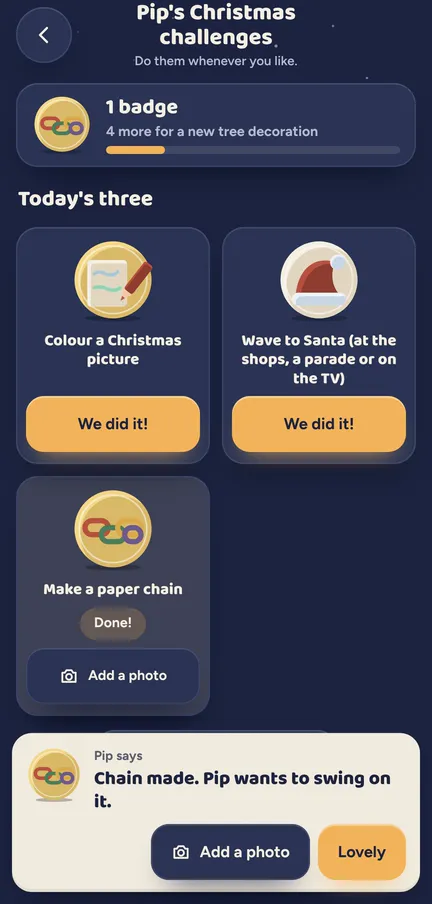
Christmas challenges is a December bucket list on the screen, with the fun happening off it. Your child picks a challenge, goes and does it, then taps "We did it!" for a badge and a cheer from their elf (a little character each child dresses in the app, no toy needed). There are 54 in all, and a few belong to one country, so a UK family sees 50.
What your child does
- Picks a challenge. Sing a carol, wave to Santa, look at Christmas lights: a fresh order on the board each week.
- Puts the phone down. Then off they go to do the real thing, with you, a sibling or the whole house.
- Taps "We did it!" Back at the board, one tap ticks it off.
- Gets a badge. The badge flies to the board, and every fifth one brings a decoration for the tree.
- Hears from their elf. Their elf has a line for every one: "You did it. Somewhere, a reindeer is humming along."
- Keeps a photo, if you like. Add a photo keeps a picture of the moment with the challenge.
The detail
- 50 challenges in the UK, 48 in the US and Australia. Cosy ones, silly ones, kind ones and noisy ones. A few differ by country, so a jumper day is a UK thing and the board fits where you live.
- Off the screen. Every challenge is something real. The app is just where the badge goes.
- Their own badges. Each child has their own board, so a big sister and a little brother can both have sung that carol.
- Words for their age. Some challenges are just for 3 to 5, some just for 6 to 10, and their elf's replies are written for each.
- Your own challenges. Add your family's own things to do, or hide any that do not fit your December.
- It ticks itself on the day. Put the panto or the school show in This December, and its challenge ticks itself on the date.
Try a door See what a morning door looks like, in your browser.
Elf Letters and more
A few emails a week until Christmas, with ideas, tips, printables and news, and one the day the app is out. Then the odd one through the year.
If that address is right, a confirmation email is on its way. Tap the link in it and everything is yours.
Sorry, our emails aren't open in your country yet.
The free printables don't need an email: get them here.
See it moving
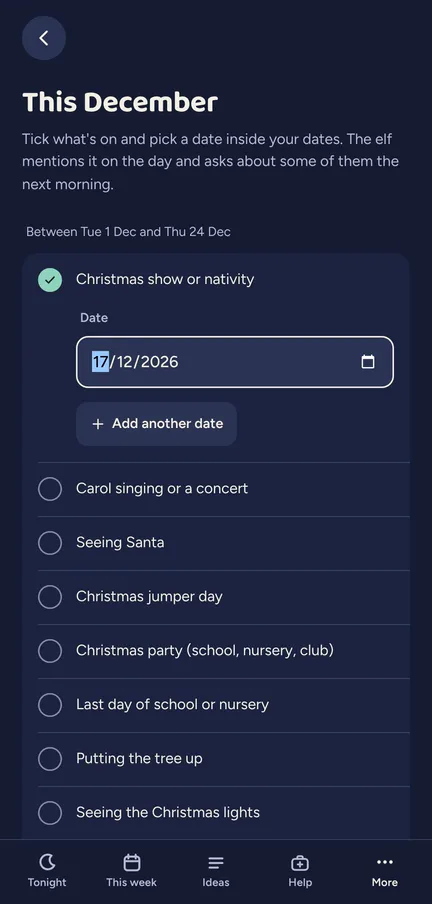
This December, on the grown-ups' side: the Christmas show is ticked and given its date.
This December: your real days
This part is the grown-up's side. You add the real days already on your calendar, from 23 kinds: the school show or nativity, seeing Santa, carols, a Christmas jumper day, the tree going up, a party, the panto, a birthday, the last day of school and more, or one of your own. Then the app joins in.
- On the morning. The door says something that fits, with a little sticker card under the morning message, read in their elf's voice.
- The morning after. Some days, like the show, a party or a birthday, get a Tell-their-elf card the next morning for your child to answer.
- Seeing Santa. The one day that brings calls: Santa's "Before your visit" and "After your visit", which only you can ring.
- The last day of school. A door card, a question the next morning, and a Last day of term video message from their elf that you can send.
- A poorly day. Kept quiet, with just a gentle line.
The days you add stay on the phone. Nothing leaves the phone unless you share it.
Which ages get what
- 3 to 5. Simple challenges, with their elf's replies in the little ones' words.
- 6 to 10. A few more challenges, and replies with a bit more cheek.
- 11 and up. Christmas challenges are not shown to 11 and up profiles.
What a grown-up controls
- The switch. Christmas challenges are on to start, in Extras.
- Choose what shows. Hide any challenge for everyone, or add your own of up to 40 letters.
- Photos. On to start, and only when the kids' camera is on.
- This December. Tick your real days with their dates, in setup or later in Settings.
Elf O'Clock in brief
- Price
- One price, everything in, for up to six people. On the App Store and Google Play at launch.
- Devices
- iPhone and iPad (iOS 15 or later), Android phones and tablets (Android 7 or later).
- Countries
- UK, Ireland, US, Canada, Australia and New Zealand.
- The promise
- No ads, no accounts, no subscription, and nothing leaves your phone unless you share it.
 Coming toGoogle Play
Questions parents ask
- What are good Christmas challenges for kids?
- Real, small and cheerful: sing a carol, wear a Christmas jumper, look at Christmas lights, wave to Santa. Elf O'Clock has 50 of them in the UK (48 in the US and Australia), each with a badge when it is done.
- Is it a Christmas bucket list?
- Yes, kept on the phone. Your child does the real thing, then taps "We did it!" for a badge and a cheer from their elf.
- Can I add our own challenges?
- Yes. Add your own, or hide any that do not suit your family.
- Does the elf ring on the last day of school?
- No. The last day of school gets a door card, a question the next morning and a video message you can send. The only day that brings calls is Seeing Santa, and you ring those.
- Do the days I add leave the phone?
- No. Nothing leaves the phone unless you share it.
- Do we need a real elf at home?
- No. The challenges are about Christmas, and the elf cheering is the one your child makes in the app.