
What your child gets, and what you control
For parents: Elf O'Clock is a digital advent calendar app for kids, and you hold the switches for what your child sees, when games close and how often Santa rings.
One payment. No subscription, no ads, no extras. Out now on iPhone and iPad. Coming soon to Android.
Each child gets a door to open each morning, a bedtime story that runs all month, games, and calls from the elf and Santa on a toy phone inside the app. You decide which of those are on, when the doors open, when the games go to bed, how often Santa rings and how lively it all is, some for the whole house and some child by child.
- Their own door each morning. Each person in the house, up to six in all, has their own advent calendar. Today's door opens at the time you choose, and behind it is the elf, a joke and most days a small surprise. It is meant as a few minutes before breakfast, not a morning on the screen.
- A story, a chapter a night. A 24-chapter Christmas story with riddles and choices, in a version for 3 to 5 and one for 6 and up, read aloud.
- Games, and games for the whole room. A Games room of 31 games (29 for ages 3 to 5, 30 for 6 to 10), and 18 party games played together on one phone.
- Calls from the elf and Santa. The elf and Santa ring on a drawn toy phone inside the app. No real calls are made, nothing listens, and if your child posts a drawing or a game score to Santa, he rings back the next day and names what you sent ("what a lovely drawing").
- A bedtime for games. Tell the app when the children go to bed and, for each child you tick (3 to 5 and 6 to 10 start ticked), the Games room and party games close at bedtime. On a special night, "Games can stay up tonight" opens them with your code. The elf's window, Goodnight and the night light follow the same bedtime.
- Elf tea breaks. After a long play in the Games room, the elf leaves a gentle card under the game's result, sleepy with a mug of cocoa, offering something quieter such as colouring. It never stops a game, and one switch turns it off.
- Simple mode for little ones. On for 3 to 5: fewer, bigger choices, six things, three games and one present at a time, with everything else waiting in More things. Switch it off for a child who wants to see everything.
- Stars and Play again. Little ones always get three full stars when they finish. For 6 to 10, Stars in games can be switched off. The Play again button can be hidden for any child under 11.
- Which parts are on. In Extras you can switch off the elf's window, the story, the Elf phone, the Magic camera and the North Pole map, and switch on Getting ready for school mornings. Planning the elf's month is on or off too: with it off, the children still get their door every morning.
- How often Santa rings. Now and then (about once a week, the setting it starts on), a bit more, only his big call, or never.
- Quieter settings, child by child. Calm means less movement, softer sounds, no vibration and a joke in place of a prank. Gentle elf goes further: calm doors, a picture timetable of the elf's December, and no calls that start by themselves. There is also No time limits, Bigger buttons, Easier-to-read letters and Read everything aloud.
- Sound. Music, sound effects and voices each switch off on their own, and vibration has its own switch.
- Unlocking games and doors. "All games unlocked" is a switch for each person: off to start with for children, where it sits on the child's card behind your code, and on for anyone 11 and up. "Open any door" can be switched on for 11 and up only, never for a child.
- A house with no children. The first time the app opens you choose who it is for, and setup asks whether an elf visits your house.
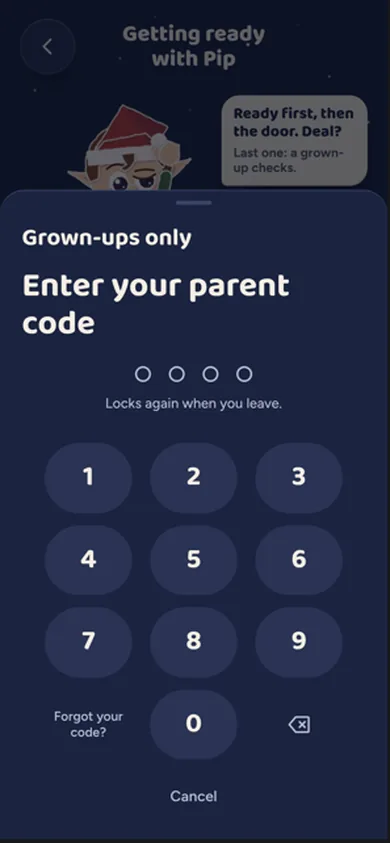
- What stays behind your code. In a house with children, the grown-ups' side sits behind a four-digit code, and a child sharing, saving or printing anything is asked for it too. The children's camera starts off on a children's tablet, picking from the phone's photos is a switch for each child (off to start with), and Paper hat only films the room if you switch that on.
- What isn't there. No ads, nothing to buy inside the app, no chat and no links out from the children's side. Nobody is graded, and nothing in it says the elves are watching anyone.
One device, one family. Elf O'Clock keeps everything on the phone or tablet it's on: there's no account, it works with no internet, and nothing leaves the phone unless you share it. You can share it with up to five family members through Apple Family Sharing or Google Play Family Library, but each device keeps its own doors and plan, so for one family calendar, use one device: the kids open their doors, and you plan behind your code on the same screen.
The settings for each child are under Extras, Each child, on the grown-ups' side. Bedtime, the games bedtime and tea breaks are together in Settings, Bedtime. Santa's calls are on the Elf phone page and in Settings, Sounds and voices. The app's Help kit also has a page on the screen time controls your phone already has (Screen Time on an iPhone or iPad, Family Link on Android), with the steps.
Elf Letters and more
A few emails a week until Christmas, with ideas, tips, printables and news, and one the day the app is out. Then the odd one through the year.
If that address is right, a confirmation email is on its way. Tap the link in it and everything is yours.
Sorry, our emails aren't open in your country yet.
The free printables don't need an email: get them here.
Questions parents ask
- How long will my child spend in it?
- The door is a few minutes a day and the story is a chapter at bedtime. The games are there when they want them, they close at the bedtime you set, and the elf suggests a tea break after a long play. You can also switch off whole parts of the app in Extras.
- Can I make it quieter for a child who finds it a lot?
- Yes. Calm, Gentle elf and Simple mode are per child, so one child can have the full fizz while a sibling has a quieter version on the same phone. When several children play a party game together, it uses the quietest of their settings.
- Does it nag my child to come back?
- No notifications go to children, and nothing is lost by skipping a day: the door is still there to open.