
School mornings in December, with their elf cheering
Dressed, teeth, breakfast, shoes, coat. Your child ticks five big pictures on a school morning in Elf O'Clock, their elf cheers each one, and the door becomes the treat, not the thing making you late.
One payment. No subscription, no ads, no extras. Out now on iPhone and iPad. Coming soon to Android.
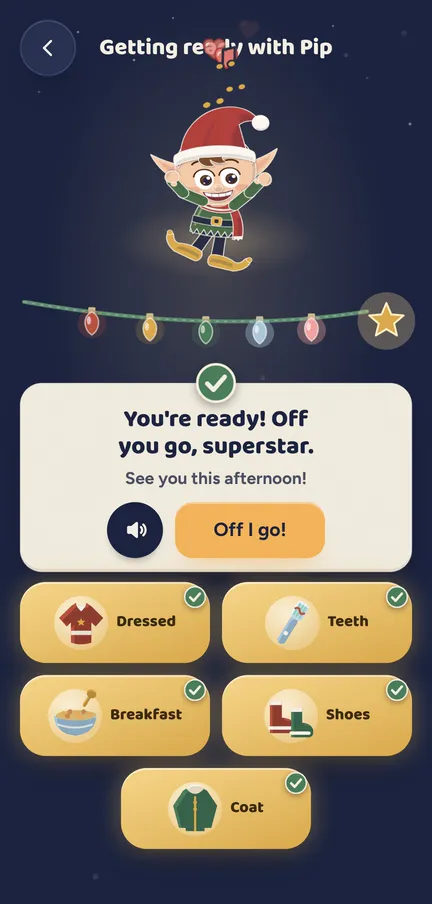
Getting ready is a picture checklist for school mornings, cheered on by their elf (a little character each child dresses in the app, no toy needed). Each tick pops and lights a bulb on a garland, and the last one sets off a celebration. There is no timer and no score. It is off until a grown-up switches it on in Settings.
What your child does
- Sees the card. On a school morning, Getting ready sits on the doors page with their elf beside it.
- Taps a picture. Dressed, teeth, breakfast, shoes and coat, each a big tile that needs no reading.
- Lights a bulb. Every tick pops, and a spark flies up to light the next bulb on the garland.
- Hears the cheer. Their elf cheers along, with a bouncy little tune of its own playing underneath.
- Finishes the list. The last tick brings confetti and "You're ready! Off you go, superstar."
- Opens the door. Then it is today's door, which is a much nicer thing to run downstairs for.
The detail
- School mornings only. It shows on weekdays up to the last day of school, or 18 December. Weekends are left alone.
- Gone by 10:00. The card goes away at 10 o'clock, so a late start never leaves a list hanging about all day.
- Your pictures. Swap in hair, a bag, a water bottle, hat and gloves, a face wash or the toilet, up to six on the list.
- A sleigh clock, if you like. Pick a leave time and a little sleigh glides in to park as it gets near. It only parks: never a race.
- No timer, no score. Nothing counts down and nothing is marked. A tick is a tick, and their elf is delighted with every one.
- Calm when you want it. With Calm on, it is stiller and quieter.
Try a door See what a morning door looks like, in your browser.
Elf Letters and more
A few emails a week until Christmas, with ideas, tips, printables and news, and one the day the app is out. Then the odd one through the year.
If that address is right, a confirmation email is on its way. Tap the link in it and everything is yours.
Sorry, our emails aren't open in your country yet.
The free printables don't need an email: get them here.
Which ages get what
- 3 to 5. Big pictures to tap, so it works long before they can read the words.
- 6 to 10. The same list, with their elf's lines written for their age.
- 11 and up. Getting ready is not shown to 11 and up profiles. They can get themselves out of the door.
What a grown-up controls
- The switch. Off to start. Turn on "Getting ready with" and your elf's name in Settings, under Extras, For the kids.
- The list. Choose which pictures show, five to start and up to six, and add the sleigh clock with a leave time between 06:30 and 09:30.
- Doors wait. For each child, "Doors wait for getting ready" keeps the door until the list is done. Off to start.
- A grown-up checks it. For each child, the last tick can ask for your parent code, so you get the final look. Off to start.
Nothing leaves the phone unless you share it.
Elf O'Clock in brief
- Price
- One price, everything in, for up to six people. On the App Store and Google Play at launch.
- Devices
- iPhone and iPad (iOS 15 or later), Android phones and tablets (Android 7 or later).
- Countries
- UK, Ireland, US, Canada, Australia and New Zealand.
- The promise
- No ads, no accounts, no subscription, and nothing leaves your phone unless you share it.
 Coming toGoogle Play
Questions parents ask
- How can I make school mornings in December easier?
- Turn the jobs into pictures and the door into the reward. In Elf O'Clock your child ticks dressed, teeth, breakfast, shoes and coat, their elf cheers each one, and today's door is waiting at the end.
- Is Getting ready on to start with?
- No. A grown-up switches it on in Settings, under Extras, For the kids.
- Does it show at the weekend?
- No. It is for school mornings only, up to the last day of school or 18 December.
- Is there a timer?
- No. Nothing counts down and nothing is scored. The optional sleigh clock only shows a little sleigh parking as the leave time gets near.
- Can the door wait until they are ready?
- Yes, if you want it to. Turn on "Doors wait for getting ready" for that child. It is off to start.
- Do we need a real elf at home?
- No. The elf cheering is the one your child makes in the app.